

Offline Password Manager
Store logins, private keys, and sensitive notes strictly on your device with hardware-backed AES-256 encryption and biometric unlock. 100% private with zero cloud servers.
 100% Offline Vault
 Bank-Grade AES-256
 Biometric Unlock
 Zero Accounts Needed
Designed for Everyday Privacy & Peace of Mind
Experience uncompromised security with zero central breach surface, zero tracking, and zero subscription fees.
100% Offline & Private
Your passwords stay strictly on your device. No cloud syncing, no remote servers, and zero risk of corporate database breaches.
Military-Grade Encryption
Every password, note, and card detail is locked with AES-256 encryption. Only you hold the master key to unlock your vault.
Instant Biometric Unlock
Unlock your vault in a fraction of a second using your fingerprint or face recognition safely on your device.

Built-in 2FA & Secure Notes
Store two-factor authentication (TOTP) codes and sensitive notes alongside your logins in one clean, organized vault.

Encrypted Backups
Create password-protected backup files whenever you want. Move your passwords to a new phone or keep a copy on a USB drive.

Smart Auto-Lock
Your vault locks automatically whenever you switch apps or step away, keeping your credentials safe from prying eyes.
True Privacy: Why Storing Passwords Offline Matters
Unlike traditional password managers that store your private passwords on corporate cloud servers, OPM keeps everything locked inside your phone. No server hacks, no tracking, and no subscriptions.
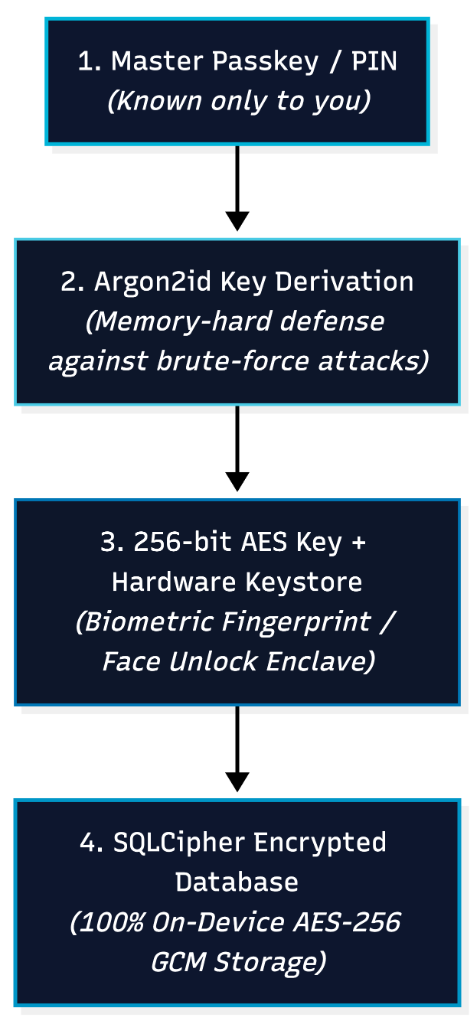
- ✓ 100% offline vault with zero cloud servers or remote tracking
- ✓ Military-grade AES-256 encryption for every stored password and note
- ✓ Instant and secure unlock using your fingerprint or face recognition
- ✓ Zero accounts, zero registration, and zero personal data collected
- ✓ Zero ads, tracking pixels, or third-party analytics
- ✓ Nominal one-time price with zero recurring subscriptions
Comparing Security & Convenience
See why an offline, private password manager gives you better control than cloud vault services.
| Feature | Cloud Password Apps | OPM (Offline Password Manager) |
|---|---|---|
| Where Passwords Live | Company cloud servers | Only on your phone |
| Risk of Mass Data Leaks | High (Target for mass attacks) | Zero (No central servers) |
| Internet Required | Yes (Syncing & telemetry) | No (Works 100% offline) |
| Account / Sign-Up | Mandatory email & login | None needed (Instant access) |
| Quick Unlock | Varies / Cloud dependent | Instant Fingerprint / Face ID |
| Encrypted Backups | Locked in company cloud | You control your backup files |
| Pricing & Subscriptions | $36 – $60 / year recurring fees | Nominal One-Time (Zero Subscriptions) |
Frequently Asked Questions
Common questions about offline password security, master password recovery, and backups.
Why should I use an offline password manager instead of cloud vaults like 1Password or Bitwarden?
Cloud password managers store millions of encrypted customer vaults on corporate servers, making them high-value targets for data breaches. OPM stores your passwords strictly on your phone. There are zero servers to breach, zero cloud logs, and zero subscription fees.
How do I back up my passwords if OPM has no cloud servers?
OPM includes a built-in encrypted backup feature. You can generate a password-protected backup file anytime and safely save it on a USB drive, your computer, or your personal storage.
What happens if I forget my Master Password?
Because OPM is built with complete privacy and zero backdoor access, only your Master Password can unlock your vault. We recommend writing down your master passphrase and storing it in a safe physical place.
How does Biometric Unlock work in OPM?
Biometric unlock (fingerprint and face recognition) uses your smartphone's built-in secure hardware. It lets you unlock your vault instantly without having to type your full master password every time.
Does OPM show ads or track my activity?
No. OPM contains zero ads, zero tracking pixels, and zero analytics. All your passwords remain strictly on your local device.
How is OPM priced?
OPM is available for a nominal one-time price on Google Play and the App Store. There are zero monthly or annual subscriptions, no paywalled features, and no limit on the number of credentials you can store.