
Over the past decade, the tech industry convinced millions of people that the only way to manage passwords was through centralized, cloud-hosted vault services. You install an app, create an account with an email address, trust a remote server farm with your encrypted blobs, and pay a monthly recurring subscription.
However, recent high-profile supply chain attacks, database leaks, and master-password hash targeting have revealed an uncomfortable truth: centralized cloud password vaults are high-value honey pots for global attackers.
When your passwords sit on a central cloud server, attackers don’t need to target your personal device, a single corporate breach gives them stolen vault copies to crack at their own pace.
Here is why managing your passwords completely offline gives you better privacy and peace of mind and how OPM (Offline Password Manager) keeps your credentials secure without relying on any cloud servers.
1. The Real Cost of Cloud Syncing
Cloud password vaults offer convenience: you create an account, log in with a master password, and your vault syncs to AWS or Azure. But this architecture introduces significant attack surfaces:
- Centralized Honey Pots: Cloud vaults are high-value targets for advanced persistent threats (APTs) and ransomware cartels.
- Metadata Leakage: Even if secrets are encrypted client-side, cloud vaults frequently leak domain names, account creation dates, IP addresses, and access timestamps in server logs.
- Data Breaches & Cloud Outages: If your cloud provider experiences downtime or a credential stuffing attack against their auth backend, you can be locked out of your credentials or exposed to brute-force attacks on exported vault blobs.
2. The Air-Gapped Advantage: Zero Network Footprint
An offline password manager eliminates these threat vectors by adhering to a simple security axiom: what never touches the network cannot be intercepted over the network.
In OPM, we implemented a zero-trust, local-only cryptographic architecture:
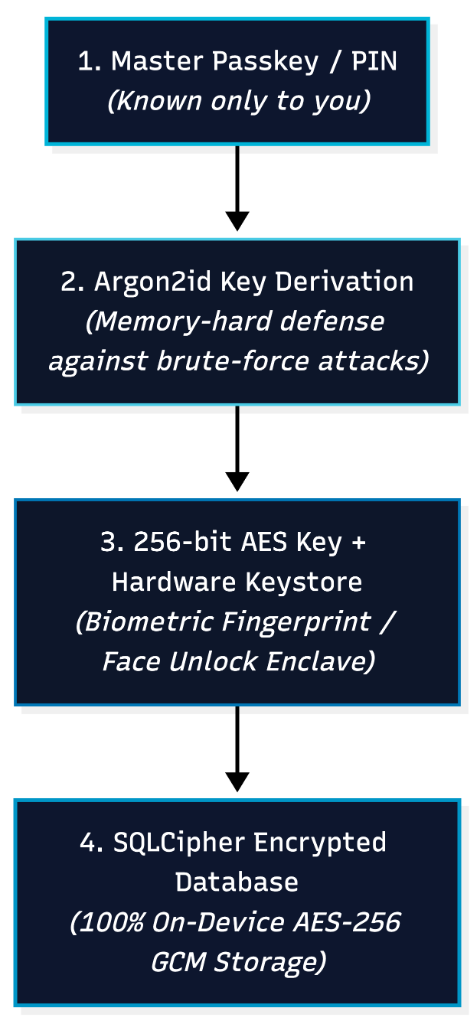
Key Technical Pillars:
A. SQLCipher AES-256 GCM Encryption
Rather than encrypting only individual text fields while leaving metadata visible in plaintext SQLite columns, OPM employs full database-page encryption powered by SQLCipher. Every table, row, index, and schema definition is transformed into high-entropy ciphertext using AES-256 in Galois/Counter Mode (GCM), providing both confidentiality and cryptographic integrity verification.
B. Argon2id Key Derivation
Brute-forcing weak master passwords requires specialized GPU and ASIC clusters. To neutralize hardware-accelerated attacks, OPM uses Argon2id—the winner of the Password Hashing Competition. Argon2 enforces memory-hard constraints that make parallelized GPU cracking computationally unfeasible.
C. Biometric Hardware Keystore Binding
Master encryption keys are never stored in plaintext on disk. Instead, keys are wrapped inside the Android Keystore / Secure Enclave hardware module. Unlocking the vault with your fingerprint or facial recognition triggers a cryptographic release inside the tamper-resistant hardware enclave.
3. Comparing Security & Privacy Models
| Feature | Cloud Password Managers | OPM (Offline Password Manager) |
|---|---|---|
| Storage Location | Remote corporate cloud servers | 100% on your device |
| Mass Data Breach Risk | High (Target of large-scale cloud leaks) | Zero (No central servers exist) |
| Internet & Telemetry | Required for sync & background tracking | 0 KB (Air-gapped, zero network calls) |
| Works Offline | Dependent on remote connection & sync | Always available (100% offline) |
| Biometric Quick Unlock | Varies / cloud session dependent | Instant via Fingerprint / Face Unlock |
| On-Device Encryption | Often partial or field-level | Full database AES-256 (SQLCipher) |
| Pricing & Subscriptions | $36 – $60 / year recurring fees | Nominal One-Time (Zero Subscriptions) |
4. Solving the Backup & Portability Challenge
A common question regarding offline security is: “What happens if I lose my phone?”
The solution is not to dump unencrypted data onto a third-party server, but rather to give users sovereign backup control:
- Encrypted Local Exports: OPM allows you to export an encrypted backup file wrapped in a separate AES-256 key.
- You Choose the Storage: Store your encrypted backup on a physical USB drive, a private home NAS, or your own personal storage folder.
- Standardized Portability: Export your database anytime with complete ownership—no vendor lock-in.
5. Taking Back Your Digital Security
Your passwords, financial credentials, and two-factor authentication secrets are the keys to your digital life. Delegating their custody to corporate cloud servers adds convenience at the cost of collective exposure.
By switching to a local-first, offline password manager, you eliminate the entire remote attack vector while enjoying instantaneous search, zero latency, and uncompromising cryptographic privacy.